

You can check your Vietnam e-Visa status in under 2 minutes on the official government portal at evisa.gov.vn – all you need is your registration code, email address, and date of birth. This guide walks you through each step, explains every possible status result, and covers what to do if your application is delayed or returned for correction.
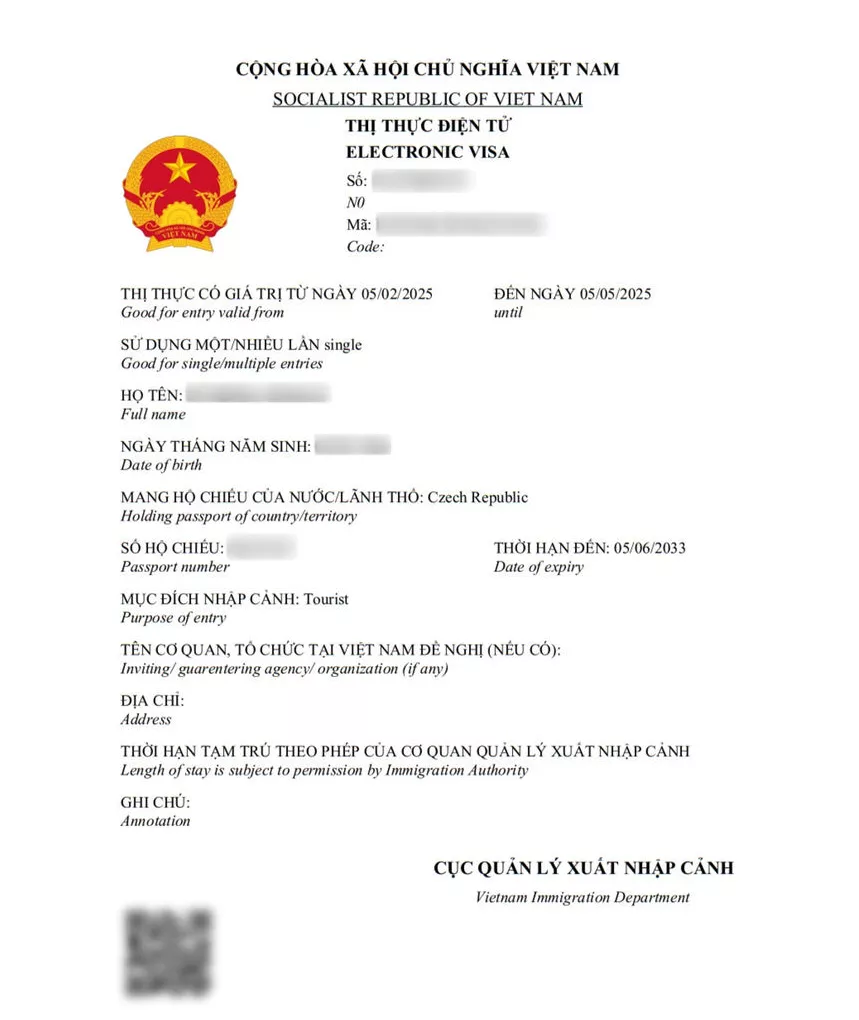
If you have not yet applied, see our complete Vietnam e-Visa application guide first.
How to Check Vietnam Visa Status Online
The Vietnam Immigration Department operates an official online portal where applicants can look up their e-Visa status at any time. Here is the step-by-step process:
Step 1. Go to the official search page: evisa.gov.vn/e-visa/search.
Step 2. Enter your registration code (also called e-Visa code or e-visa reference number).
Step 3. Enter the email address you used when submitting your application.
Step 4. Enter your date of birth in DD/MM/YYYY format.
Step 5. Complete the captcha verification shown on the page.
Step 6. Click Search (labeled “Tra cuu” on the Vietnamese-language version of the portal).
The portal will display your current application status immediately. There is no login required – the registration code and personal details are used to verify your identity.
You can also access the same service through the alternative URL at evisa.xuatnhapcanh.gov.vn/tra-cuu-thi-thuc, which leads to the same government database.
What You Need to Check Your Vietnam e-Visa Status
Before visiting the status check page, gather the following information:
| Item | Details |
|---|---|
| Registration code | The code you received when you submitted your application (e.g., E250702USA52585630045) |
| Email address | The same email you entered on your application form |
| Date of birth | In DD/MM/YYYY format (day-month-year, not month-day-year) |
| Captcha code | Displayed on the search page itself – no need to prepare in advance |
If you cannot find your registration code, check the confirmation email sent by the Vietnam Immigration Department when you first applied. It is also displayed on-screen immediately after submission. For detailed information about required documents at each stage, visit our Vietnam e-Visa requirements page.
Understanding Your Visa Status Results
After entering your details and clicking Search, the portal will show one of several possible statuses:
Granted
Your e-Visa has been approved. A download link will appear on the results page. Click to download the PDF file containing your official electronic visa. You must print this document and carry it when you travel.
Amended Application (with reason)
The immigration authorities found an issue with your submission – typically a missing field, an unclear photo, or incorrect passport details. The portal will display a reason explaining what needs to be corrected. You should re-submit the application with the required fix as soon as possible.
Amended Application (without reason)
In some cases the system does not display a specific reason for the amendment request. If you see this status with no explanation, review your entire application carefully. Common issues include blurry passport scans, photos that do not meet the specifications, or the “Address in Vietnam” field left blank.
Processing (no result yet)
Your application is still being reviewed. This is normal during the first 3-5 working days after submission. Read the section below on what to do if processing takes longer than expected.
For a full breakdown of processing timelines, see our guide on Vietnam e-Visa processing time.
What Your Registration Code Looks Like
The registration code (sometimes called the e-Visa code or reference number) follows a specific format issued by the Vietnam Immigration Department. It typically starts with the letter E followed by the application date and nationality country code.
Example format:
E250702USA52585630045
In this example:
– E – prefix for e-Visa applications
– 250702 – date (YY/MM/DD format)
– USA – nationality country code (ISO 3166-1 alpha-3)
– 52585630045 – unique application sequence number
If you applied through a third-party agency instead of the official portal, you may have a booking number (e.g., 79902020) instead of an E-prefixed code. In that case, check your status directly through the agency’s tracking tool rather than the government portal.
Your e-Visa Was Granted – What to Do Next
When your status shows “Granted” with a download link, follow these steps:
- Download the PDF – Click the link on the search results page to save your e-Visa to your device.
- Print a hard copy – Airlines and immigration officers at Vietnamese airports typically ask for a printed e-Visa. While some travelers report presenting the document on a phone screen, a printed copy is strongly recommended to avoid boarding or entry issues.
- Check the details – Verify that your name, passport number, date of birth, and entry/exit dates are all correct. Errors at this stage can cause problems at the airport.
- Carry it with your passport – The printed e-Visa must be presented alongside your passport at immigration when you arrive in Vietnam.
If you need to know the full cost breakdown for your e-Visa, refer to our Vietnam e-Visa fee article for the latest pricing by nationality.
Application Returned for Correction
A status of “Amended Application” means the Vietnam Immigration Department reviewed your submission and found something that needs fixing. This is not a rejection – your application is still active, and you can re-submit after making corrections.
Common reasons for an amended application include:
- Blurry or non-compliant photo – The passport-style photo must meet official specifications (white background, no glasses, clear face).
- Passport scan quality issues – Blurred, cropped, or low-resolution passport bio page scans.
- Missing “Address in Vietnam” field – One of the most frequently overlooked fields. Enter the name and address of your hotel or accommodation.
- Incorrect passport number or nationality – Double-check that all passport details match exactly.
- Wrong visa type or entry port – Ensure you selected the correct visa category and intended port of entry.
To fix your application: return to the e-Visa portal, edit the incorrect fields, and re-submit. Each correction returns the application to the processing queue, so allow another 3-5 working days for review.
Application Stuck on Processing
The standard processing time for a Vietnam e-Visa is 3 to 5 working days. In some cases it can take up to 7 working days during peak travel periods or holidays.
If your application has been in “Processing” status for more than 7 working days:
- Re-check your email – including spam and junk folders – for any correspondence from the immigration department.
- Log back into the portal to verify no status update or amendment request was issued that you missed.
- Contact the Vietnam Immigration Department directly:
- Email: [email protected] or [email protected]
- Phone (Hanoi): 024 3826 4026
- Phone (Ho Chi Minh City): 028 3920 0365
- If your travel date is approaching, consider applying for a new e-Visa or contacting a licensed visa agency for urgent processing assistance.
When contacting immigration, have your registration code and passport number ready. Processing delays are most common during the December-January holiday period and around Vietnamese public holidays such as Tet (Lunar New Year).
Third-Party Visa Status Trackers
Several private visa services offer status tracking tools that query the Vietnam immigration system on your behalf. These can be an alternative if you have trouble using the official portal directly:
| Service | How It Works | Website |
|---|---|---|
| Atlys | Enter passport details or scan your passport; queries the government portal in under 1 minute | atlys.com/tools/vietnam-visa-status-checker |
| RushVietnamVisa | Enter your booking number and email; checks applications made through their service | rushvietnamvisa.com/track.html |
| VietnamVisaCenter | Enter order ID and password from your confirmation email | vietnamvisacenter.com/check-e-visa-status |
Note that third-party tools require you to share personal information with a private company. If you applied directly through the government portal (evisa.gov.vn), using the official status check page is the safest and most direct option.
FAQs About Vietnam Visa Status Check
How to check Vietnam visa status online?
Visit the official portal at evisa.gov.vn/e-visa/search, enter your registration code, email address, date of birth, and captcha, then click Search. The results page shows your current application status instantly.
Can I check my Vietnam visa status by passport number?
The official government portal requires your registration code and email, not your passport number alone. Some third-party tools like Atlys allow passport-number-based lookups, but they query the same government database.
How long does it take for a Vietnam e-Visa to get approved?
Standard processing takes 3 to 5 working days. During peak periods it can take up to 7 working days. For more details, read our Vietnam e-Visa processing time guide.
I lost my registration code – how can I check my status?
Search your email inbox for messages from the Vietnam Immigration Department or from evisa.gov.vn. The registration code is included in the confirmation email sent when you submitted your application. If you cannot find it, contact [email protected] with your passport details.
My e-Visa status says “Amended Application” – what does that mean?
It means the immigration department found an issue with your submission and is requesting a correction. This is not a rejection. Edit your application on the portal to fix the indicated issue, then re-submit. Allow another 3-5 working days for processing after resubmission.
Can I present my e-Visa on my phone at the airport?
While some airlines and immigration officers may accept a digital copy on your phone screen, you should always carry a printed hard copy. Boarding and entry procedures are smoother with a physical document, and some airlines require it.
Is there a phone number to call about my Vietnam e-Visa status?
Yes. You can call the Vietnam Immigration Department hotlines: Hanoi at 024 3826 4026 or Ho Chi Minh City at 028 3920 0365. Have your registration code and passport number ready before calling.
Does the official status check cost anything?
No. Checking your application status on the government portal is completely free. You do not need to pay any fee to look up your e-Visa status.